Mary Gray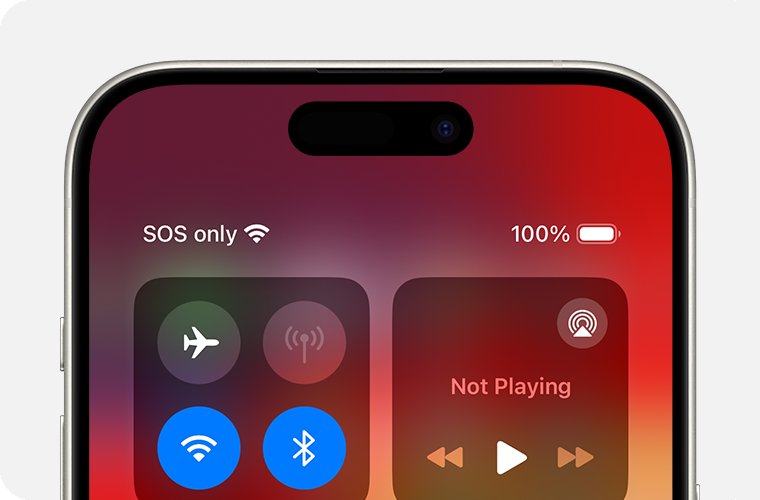

You glance at your phone and see “SOS” or “SOS Only” where your signal bars should be. Your first reaction is probably panic. Don’t worry — in most cases this is fixable in under two minutes. This guide explains exactly what it means, why it happens on both iPhone and Android, and how to clear it step by step.
Table of Contents
- SOS on your phone means it can reach emergency services but not your regular carrier network.
- The most common causes are poor coverage, a loose SIM card, or a carrier settings issue.
- Most fixes take less than 2 minutes: restart, toggle Airplane Mode, or reseat the SIM.
- On iPhone, SOS is more visible because Apple shows it prominently in the status bar.
- If nothing works, your carrier can usually fix it remotely in one call.
What Does SOS Mean on a Phone?
SOS on your phone means your device has lost its normal connection to your carrier’s network. It can no longer make regular calls, send texts, or use mobile data. The only thing it can do is call emergency services — like 911 in the US, 999 in the UK, or 112 in Europe.
Think of it like this: your phone is still connected to a network, just not your network. In SOS mode, your phone borrows signal from any available carrier nearby — but only for emergencies.
On iPhone, you’ll see “SOS” or “SOS Only” in the top-right corner of the status bar. On Android, you may see “Emergency Calls Only” or “SOS” depending on the manufacturer.
The SOS label itself is not dangerous. It’s just your phone telling you it’s lost its normal carrier connection. The question is: why did that happen?
Why Is My Phone Saying SOS?
There are six common reasons your phone shows SOS. Start at the top of this list — the most common causes come first.
1. You’re in a Low or No Coverage Area
This is the #1 reason. If you’re in a basement, a rural area, a thick-walled building, or somewhere your carrier simply doesn’t have towers, your phone drops to SOS. The fix: move to a window, go outside, or drive to an area with better reception.
2. Your SIM Card Is Loose or Damaged
The SIM card is the small chip that connects your phone to your carrier. If it’s slightly misaligned — from a drop, a case change, or just time — your phone loses the carrier connection and shows SOS. Reseating the SIM (taking it out and putting it back in) fixes this surprisingly often.
3. Carrier Network Outage
Sometimes it’s not your phone at all. Your carrier’s local towers may be down for maintenance or due to damage. Check your carrier’s outage page or search “[carrier name] outage” on Wi-Fi or another device to confirm.
4. Your Account Has an Issue
If your account is suspended, past due, or has a billing problem, your carrier can cut off your normal service. You’d still see SOS because emergency calls can’t be blocked. Log into your carrier account online or call from a different phone.
5. A Software Bug or Failed Update
A glitchy iOS or Android update can disrupt your carrier settings. This is especially common after major OS updates. A restart usually clears it — but sometimes you need to reset network settings (more on that below).
6. You’re Using an Incompatible SIM or Unlocked Phone
If you recently switched carriers and your phone isn’t fully unlocked, or the new SIM isn’t provisioned yet, your phone may sit in SOS mode until the carrier activates your line. Call your new carrier directly.
How to Fix SOS on iPhone
Try these steps in order. Most people fix the issue by step 3.
Step 1: Restart Your iPhone
A restart clears temporary network glitches. Hold the side button + volume button (or just the top button on older iPhones) until the power slider appears. Slide to power off, wait 30 seconds, then turn it back on.
Step 2: Toggle Airplane Mode
Open Settings → Airplane Mode. Turn it ON, wait 15 seconds, then turn it OFF. This forces your iPhone to re-register with nearby towers. It’s the fastest fix and works in about 40% of cases.
Step 3: Reseat Your SIM Card
Use the SIM ejector tool (or a straightened paperclip) to open the SIM tray. Take out the SIM, inspect it for damage, then reinsert it firmly. Power your phone back on. If your iPhone uses an eSIM, skip this step and go to step 4.
Step 4: Check for a Carrier Settings Update
Go to Settings → General → About. If a carrier update is available, a prompt will appear automatically. Tap “Update” and wait. These small updates often fix network connectivity issues.
Step 5: Reset Network Settings
This clears all saved Wi-Fi passwords, VPN settings, and network configurations — so only use it if the above steps failed. Go to Settings → General → Transfer or Reset iPhone → Reset → Reset Network Settings. Your phone restarts and re-registers on the network fresh.
Step 6: Update iOS
Go to Settings → General → Software Update. If an update is available, install it. Apple regularly releases patches that fix carrier and network bugs.
Step 7: Contact Apple Support or Your Carrier
If none of the above works, the issue may be hardware (a damaged SIM reader) or account-related. Contact Apple Support at apple.com/support or call your carrier directly. They can run diagnostics remotely on your line.
For a deeper dive into iPhone-specific causes — including eSIM issues and iOS 17/18 bugs — see our guide on why your iPhone says SOS.
How to Fix SOS on Android
Android phones show SOS or “Emergency Calls Only” for the same core reasons as iPhone. The menus look different, but the fixes are the same.
Step 1: Restart the Phone
Hold the power button, tap Restart. Wait for it to fully boot and reconnect to the network (give it 60 seconds after startup before judging).
Step 2: Toggle Airplane Mode
Pull down the notification shade and tap the Airplane Mode icon. Wait 15 seconds, then turn it back off. On Samsung, Pixel, and most Android phones this forces a full network re-scan.
Step 3: Reseat the SIM
Same as iPhone — eject the SIM tray, remove the SIM, reinsert it firmly. Power the phone back on.
Step 4: Check Preferred Network Type
Sometimes Android phones get stuck trying to connect to a network band your carrier doesn’t support in your area. Go to Settings → Connections → Mobile Networks → Network Mode (exact path varies by manufacturer). Try switching from 5G to LTE/4G only, or from LTE to 3G, to see if the phone reconnects.
Step 5: Reset Network Settings
On Samsung: Settings → General Management → Reset → Reset Network Settings. On Pixel: Settings → System → Reset Options → Reset Wi-Fi, Mobile & Bluetooth. This clears saved networks and forces a fresh connection.
Step 6: Update the OS and Carrier Settings
Go to Settings → Software Update and install any pending updates. Carrier settings updates on Android often happen automatically, but a manual OS update can include carrier fixes bundled in.
SOS After an iOS or Android Update
This is one of the most common complaints. You update your phone overnight and wake up to SOS. Here’s what’s happening and how to fix it fast.
Major OS updates sometimes reset or corrupt carrier settings. Your phone forgets how to authenticate with your carrier’s network properly. The fix sequence:
- Restart the phone (do this first — fixes it in ~60% of post-update SOS cases).
- Toggle Airplane Mode on/off.
- Check Settings → General → About for a carrier update prompt (iPhone).
- If still stuck: Reset Network Settings.
- Last resort: remove and reinsert SIM, then restart.
If you updated to a major iOS version (like iOS 18) and the problem persists after all steps, check Apple’s support forums — there’s often a patch released within a few days for widespread issues.
SOS When Traveling or Abroad
Seeing SOS in another country is alarming but very common. Here’s why it happens and what to do.
Your carrier may not have a roaming agreement with local networks in certain countries or regions. Your phone tries to connect, fails, and falls back to SOS (emergency-only mode). Fixes:
- Enable roaming: Go to Settings → Cellular → Cellular Data Options → enable “Data Roaming.” Note: roaming charges may apply.
- Buy a local SIM: Swap your SIM for a local prepaid one. Your home SIM goes back in when you return.
- Use an eSIM: Services like Airalo or Google Fi let you add a local eSIM without touching your physical SIM.
- Contact your carrier before travel: Make sure international roaming is activated on your plan — some plans disable it by default.
If you’re on a cruise ship or in a very remote area (mountains, desert, deep jungle), there may simply be no available signal at all. In this case, SOS is normal — satellite-based SOS (available on iPhone 14+ and some newer Android phones) may still let you reach emergency services via satellite even with zero tower coverage.
What You Can Still Do in SOS Mode
Being in SOS mode doesn’t mean your phone is completely useless. Here’s what still works:
- Call emergency services (911, 999, 112): Always works, no carrier required.
- Use Wi-Fi: Your phone can still connect to Wi-Fi networks. Once on Wi-Fi, you can use apps, iMessage (over Wi-Fi), WhatsApp, and internet calling (Wi-Fi calling must be enabled).
- Wi-Fi Calling: If your carrier supports it and you have it enabled, Wi-Fi calling lets you make and receive regular calls over Wi-Fi even in SOS mode. Enable it in Settings → Phone → Wi-Fi Calling (iPhone) or Settings → Connections → Wi-Fi Calling (Android).
- Emergency SOS via Satellite (iPhone 14+): Apple’s satellite SOS works even with zero bars. Press and hold the side button + volume button, swipe to Emergency SOS, then follow the on-screen prompts to connect via satellite.
- Offline features: Apps, photos, notes, downloaded music, and maps (if downloaded for offline use) all still work normally.
When to Contact Your Carrier
Try all the DIY fixes first. If your phone has been showing SOS for more than 30 minutes and you’re in an area where you normally have coverage, it’s time to call your carrier. Tell them:
- Your phone model and OS version.
- When the SOS started (after an update? After traveling? After a SIM swap?).
- What troubleshooting steps you’ve already tried.
Carriers can push a fresh provisioning update to your SIM remotely, flag account issues, or send a replacement SIM if yours is damaged — usually resolved in one call.
Frequently Asked Questions
Can I still text when my phone says SOS?
No. Standard SMS texts require your carrier network. In SOS mode, you can’t send or receive regular texts. However, if you connect to Wi-Fi, iMessage and WhatsApp work normally because they use the internet, not your carrier signal.
Will my phone automatically call 911 in SOS mode?
No — SOS mode just means emergency calls are available. Your phone won’t auto-dial 911 just because it shows SOS. The Emergency SOS feature (activated by pressing the side button rapidly 5 times) will call 911, but only if you trigger it.
Why does my iPhone say SOS but my Android works fine (or vice versa)?
Different phones connect to carrier networks differently. If you’re in the same location with two different phones, one may support a local network band the other doesn’t. Try the Airplane Mode toggle and network type change fixes described above.
My phone says SOS only at home — why?
Your home may be in a weak coverage zone for your specific carrier. Try Wi-Fi Calling (it routes calls over your home internet instead of cell towers) or contact your carrier about a signal booster. Moving closer to a window often helps too.
Is SOS mode the same as Airplane Mode?
No. Airplane Mode turns off all wireless signals — cell, Wi-Fi, and Bluetooth. SOS mode keeps emergency cellular access active and lets you still use Wi-Fi. They look similar but work very differently.
Why does my phone say SOS after I got a new SIM card?
A new SIM needs to be activated by your carrier before it works. If you swapped SIMs and immediately see SOS, the new SIM isn’t provisioned yet. Call your carrier to activate it or wait up to 24 hours if you activated online.
Phone stuck in SOS mode after trying everything — what now?
At this point, it’s likely a hardware issue (damaged SIM reader, antenna problem) or an account issue only your carrier can fix. Visit a carrier store in person — they can test your SIM in another phone, check your account status, and inspect the SIM tray for damage.
Reading Time: 6 minutes

 John Peterson